Pages

file uploading PHP

If you need a upload a file using PHP. This is a easiest and nice way to do that. Only one line I used. You can add validation part according to your need.

Html part

<form action="upload_file.php" method="post" enctype="multipart/form-data">
<label for="file">Filename:</label>
<input type="file" name="file" id="file" />
<br />
<input type="submit" name="submit" value="Submit" />
</form>


The enctype attribute of the <form> tag specifies which content-type to use when submitting the form. "multipart/form-data" is used when a form requires binary data.

The type="file" attribute of the <input> tag specifies that the input should be processed as a file. For example, when viewed in a browser, there will be a browse-button next to the input field


one line php script

<?php
$path="E:\tharu\";
move_uploaded_file($_FILES["file"]["tmp_name"],$path.$_FILES["file"]["name"]);
?>


[file][tmp_name] - temporary storage of file .now we save this file any place we want
path = specific path
[file][name] - name of the file

JQuery Toggle example

This is a very simple toggle example.After done toggle effect I used it different ways. I'm not considering look and feel anyone can change the CSS file very easily.


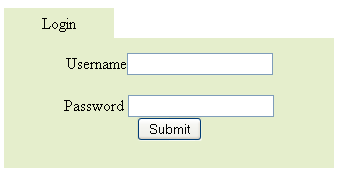
when click the Login button login box will appear below the button.

screen shot of login box


Jquery code for this example

<script type="text/javascript" src="jquery.js"></script>
<script type="text/javascript">

$(document).ready(function()
{
$(".flip1").hide();
$(".box").hide();
$(".flip").click(function ()
{
$(".box").slideToggle(1000);
$(".flip1").show();
$(".flip").hide();
});

$(".flip1").click(function ()
{
$(".box").slideToggle(1000);
$(".flip1").hide();
$(".flip").show();
});

});

</script>


html login form
<body>

<p class="flip">Login</p>
<p class="flip1">Login</p>

<div class="box">

Username<input type="text" name="user"> <br/><br/>
Password <input type="password" name="password"><br/>
<input type="submit" value="Submit"/>
</div>


</body>


simple CSS style sheet


<style type="text/css">
div.box
{
margin:0px;
padding:15px;
text-align:center;
background:#e5eecc;

}
div.box
{
height:100px;
width:300px;
display:none;
}

p.flip ,p.flip1
{
height:20px;
width:100px;
margin:0px;
padding:5px;
text-align:center;
background:#e5eecc;

}

</style>


Html / Css simple template free


This free website template has been coded in CSS. This is a very simple one and anyone can change it.
Header banner - image or flash banner
Logo - space to add logo
Navigation bar - Top navigation bar
Two columns
Load content to the left panel


Above I uploaded screen shots for get idea.You can download this template using this link.